
Follow the comparison
In Paycheck result, open a row under Line by line. The detail shows expected, confirmed paid, and difference values. Under Only the work behind this line, open an applicable component to inspect its calculation and rule snapshot.
The evidence chain is: recorded work → applied rule and rate → expected component → confirmed paystub value. Each stage answers a different question. Confirming a source number does not prove that the configured rule covers your entire agreement.
If no expected component is applicable, check for incomplete work or an incompatible paystub layout. Do not invent a missing line-level explanation from a total-only difference.
Inspect rules and original documents
Use the component’s evidence or Rule snapshot → Rules used · version … to inspect the relevant snapshot and references. A reference entered by you is not independent verification by LinePaycheck.
Imported agreement references can also retain a quotation, physical PDF page and file fingerprint. Open the cited original to inspect that page. The app checks its bytes against the recorded fingerprint; that check establishes file identity, not legal validity. A missing original remains an evidence limitation.
Use View original paystub to open retained source pages. For a mapped field, View source for this field can take you to the relevant region. Check labels and current-period columns as well as digits.
A manually entered audit or one whose original was removed can retain confirmed values without a document. “No original available” is an evidence limitation, not permission to imply that the app verified the source.
Prepare a worker-owned PDF
-
Open the required audit from Pay or History. For an older revision, select that revision first.
-
Under Share with payroll, choose Prepare a report to share.
-
Keep the default minimized report, or explicitly choose Include optional source details after reading its sensitive-content warning. Include follow-up history and notes is a separate, default-off choice: notes can contain personal information, so inspect them before sharing.
If you select follow-up history, the report names the comparison item attached to each note, or says that the note applies to the whole paycheck comparison. Both the note and its selected item stay out of the default report.
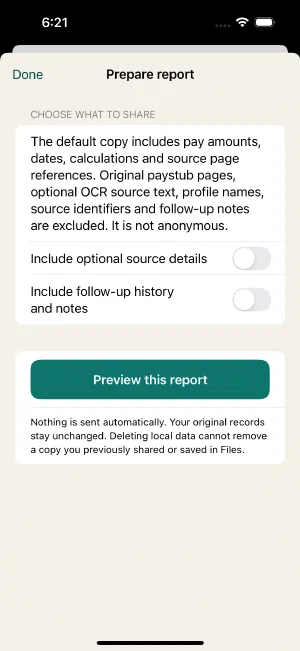
The default report is minimized; preview it before anything can be shared. LinePaycheck 1.1.0, synthetic data. -
Choose Preview this report and inspect the exact generated PDF. Share report becomes available only after this preview.
-
Review the period, comparison scope, limitations, and sensitive amounts before selecting a destination in the system share sheet.
The default report excludes original paystub pages, optional OCR source text, profile names, source identifiers, follow-up notes, and follow-up scope, but it still contains sensitive pay amounts/dates and is not anonymous. Optional source details can add private agreement quotations and fingerprints, rule references, and OCR text and require a new review. Share only with an intended recipient and avoid public links. A previously saved or shared copy is outside later local deletion. Preparing or sharing a PDF does not contact payroll on your behalf.
Existing records and exports remain available without Pro. A PDF is a report, not a complete restorable backup.
Ask a focused question
For example:
For the work period [dates], my recorded work and confirmed rules produce [expected amount] on [gross basis]. The paystub shows [confirmed amount]. Could you help explain the difference in [specific line or scope]? I may be missing a rule or adjustment.
Fill this from your actual reviewed records, not the guide’s examples. Do not state that a flagged amount is legally owed solely because the app found a difference.
Preserve a recoverable copy
Use Backup and restore to preserve records and retained originals. Removing an original affects every audit revision sharing that source; see privacy and deletion before doing so.
The v2 development workflow has a separate employer-benefits report . Choose the intended fund revision before preparing it; it does not change the wage verdict.
In the v2 candidate, an outdated active weekly check requires a new review before it can be shown as a current comparison. A historical weekly report keeps its original amounts and Recorded verdict, with an Earlier weekly comparison note about missing mapping. This is preserved history, not current weekly-pay verification. Native report/interaction acceptance remains pending.
Premium-only precision in the v2 candidate
Development preview: final App Store release and physical-device acceptance remain pending. An older Base + premium only check may have reconstructed base pay from rounded decimal hours. At a half-cent this can change a line by one cent even when gross is correct. New checks use exact base-time evidence. An older active monetary-line check requires an explicit new review; its original values remain in the earlier revision. Earlier recorded comparison and a premium-only scope note identify preserved historical results, including their Recorded verdict in reports. Missing exact evidence keeps a new line comparison in review until recalculated from original work and rules. This does not verify missing weekly or agreement coverage.
Still unsure? Keep your original records and get help before changing facts to make a total match.