
Confirm the three minimum fields
In Review paystub, check Pay period starts and Pay period ends against the paystub and turn on These dates match the paystub. Then enter Gross pay: typing it yourself counts as your confirmation, while a value read from a scan or file needs Confirm … matches the paystub.
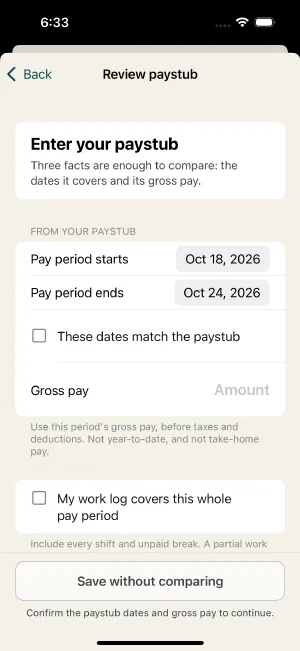
The period dates must match the selected work period. Use the paycheck’s current-period gross, not year-to-date earnings, net pay, an hourly rate, or a bank deposit.
The compare action stays unavailable until the dates and gross pay are confirmed. Editing a previously confirmed value removes its confirmation; confirm it again after correcting it.
Read the OCR evidence
For a machine-read gross amount, Original OCR reading, Source page, and Text recognition confidence describe what was extracted. The score estimates text recognition; it does not verify the paycheck value or any pay rule. A high score still requires confirmation, and a corrected amount does not change the recorded original reading.
Expand How the dates were read to inspect date suggestions. Low-confidence dates show a warning. In optional field review, the same evidence appears next to the source excerpt. Conflicting rows or ambiguous current/YTD columns can have No safe suggestion; enter and confirm the actual current-period value from the original.
Inspect the original when available
In a field’s review screen, an OCR suggestion can show the source excerpt and View original field, page …. Without a mapped region, use View original paystub. Compare the number with its label and column, not just nearby text.
A source highlight helps you find evidence. It does not prove that OCR selected the right column or that your agreement is represented correctly. Manually entered facts may have no attached original.
Confirm what is being compared
Turn on My work log covers this whole pay period only after checking the complete work log, including earlier shifts and unpaid breaks.
Under What does the gross pay include?, choose the confirmed Gross basis: wages only, or wages including the per diem represented in the ledger. Leave it unconfirmed when you do not know. See gross and earnings layouts before guessing.
Without complete work or a known gross basis, the action becomes Save without comparing, and the bar above it names exactly what is still missing. This preserves a limited record instead of presenting an unsupported full-paycheck difference. It does not consume the first comparable Free audit.
Review optional lines
Expand Hours and earnings lines for regular, overtime, and double-time hours/pay, callout pay, and per diem. Open and confirm only values you can identify on the source.
A blank field is unverified, not zero. Enter and confirm zero only when it genuinely represents the source. Exclude this unconfirmed line removes an uncertain optional value from the comparison and marks the remaining coverage as limited.
When entering hourly line details, review How earnings lines are reported: full-rate or premium-only layout, the meaning of hours, and where callout guarantees appear. Turn on Other pay lines or rules remain unmapped when applicable and leave a useful note.
Save and review the outcome
Choose Compare with expected pay once the dates, gross pay and comparison questions are answered. Read the resulting verdict together with its scope and review reasons. A successful save is not a declaration that every earnings obligation was checked.
Draft changes are saved locally. If a field or review cannot be saved, keep it open, address storage or the stated problem, and retry rather than assuming the latest values survived.
Next: Understand your audit result .
Still unsure? Keep your original records and get help before changing facts to make a total match.