
Read the scope with the result
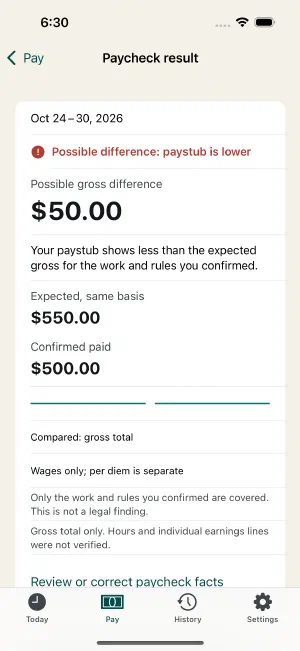
Open Pay → View paycheck result, or choose View paycheck result for the period in History. Check the period dates and gross basis, then read both the verdict and scope.
Compared: gross total means the confirmed gross was compared with the expected amount on the selected basis. Compared: confirmed lines covers the specific lines you reviewed and that the app could map. Blank fields, unsupported rules, and unreviewed source details are not silently verified.
What each status means
| Status | How to read it |
|---|---|
| Not compared yet | No completed paycheck comparison is available for this context. |
| Unable to verify | A prerequisite, such as complete work or confirmed gross basis, is missing. Read the reason before making a full-paycheck conclusion. A pay-period mismatch is stopped before any comparison: the app tells you the dates do not match and compares nothing. |
| No difference within compared items: gross total only | The gross totals match on the confirmed basis. This does not verify every line or entitlement. |
| No difference within compared items | The supported, supplied values match within the comparison’s scope. This is not certification of all wages owed. |
| Possible difference: paystub is lower | Comparable expected pay is higher than confirmed paid pay. Review facts and coverage before contacting payroll. |
| Possible difference: paystub is higher | Confirmed paid pay is higher than expected. This can reflect missing work, rules, adjustments, or categorization; it is not automatically money you can treat as extra earnings. |
| Needs review | Conflicting details, incomplete mapping/rules, or stale work can prevent a clean conclusion. Read every reason. |
Awaiting paycheck in History describes a closed work period without a paycheck yet. It is not a pay-error verdict.
Weekly comparison safeguards in the v2 candidate
Development preview: native interaction, migration and report validation for these changes is still pending; this is not an App Store release receipt.
When weekly scope is configured or a weekly result is attached, the comparison stays Needs review until complete workweeks and any additional premium are actually mapped into this paycheck. A short pay period can belong to an overtime week. A separate weekly review does not clear this guard, and the shown configured difference does not establish a shortfall or overpayment.
An active older weekly check requires Review or correct paycheck facts. This creates a new check while keeping the earlier verdict, amounts and evidence. Use View recorded comparison, where offered, to inspect its saved revision before correcting or closing the period. An archived Earlier recorded comparison remains a record of its original scope; a report labels its Recorded verdict. Do not treat that older match as current proof of complete weekly coverage.
Interpret the sign
The detail screen labels the amount Expected minus confirmed paid. A positive difference means expected was higher; a negative difference means confirmed paid was higher. Check that you are comparing the same period, currency, and gross basis.
Using the synthetic ledger example, $3,016 expected versus $2,900 confirmed gives a possible $116 difference. That is not evidence that a real worker recovered $116 or that a particular line caused it.
A matching total can hide differences
Suppose expected regular pay is $400, while confirmed gross is also $400 but the paystub reports $350 regular and $50 overtime. The gross matches, but the component classification differs. Offsetting differences are still reasons to review; they do not cancel each other into a full clean verdict.
Likewise, differing confirmed hours can require review even when money matches. Tap a compared line to inspect the work and evidence behind it.
When work, rules or calculation change
An earlier audit is no longer current after relevant input changes or a calculation-precision update that changes its ledger. Use Review or correct paycheck facts to review it again. Previous audit revisions preserve what was compared earlier; do not use an old screenshot as proof of the new state.
Before contacting payroll
Check the complete work log, unpaid breaks, rate/version, confirmed source fields, gross basis, and earnings layout. Note any missing coverage. Then share a focused question and, when useful, an audit report .
Use neutral language: “Can you help reconcile this difference?” LinePaycheck provides records and comparisons, not a legal finding or a guarantee that money is owed.
Keep track of a paycheck question
Choose Follow up → Track this paycheck question on the result screen. Select a Status, enter What happened?, and choose Save follow-up. When that saved comparison contains monetary line items, the Comparison item section’s Follow-up scope picker lets you attach the note to one item or keep the default Whole paycheck comparison. Review the displayed expected, confirmed-paid and difference values; choosing an item records context and does not change the comparison. Each dated entry stays tied to the paycheck revision you reviewed. History shows the selected item, or the whole-paycheck scope. After correcting a paycheck, notes about earlier versions are labelled Different paycheck revision.
Your notes do not change the calculation or its verdict. Correction confirmed by me and Explanation accepted by me record your judgement; LinePaycheck has not verified a recovery or contacted your employer. Follow-ups stay available without Pro and are included in a complete backup. Deleting the period deletes its follow-ups.
Premium-only precision in the v2 candidate
Development preview: final App Store release and physical-device acceptance remain pending. An older Base + premium only check may have reconstructed base pay from rounded decimal hours. At a half-cent this can change a line by one cent even when gross is correct. New checks use exact base-time evidence. An older active monetary-line check requires an explicit new review; its original values remain in the earlier revision. Earlier recorded comparison and a premium-only scope note identify preserved historical results, including their Recorded verdict in reports. Missing exact evidence keeps a new line comparison in review until recalculated from original work and rules. This does not verify missing weekly or agreement coverage.
Still unsure? Keep your original records and get help before changing facts to make a total match.